 JobClay
Job boards outside the US
A job portal or jobs board in your country and your currency
You are starting a job portal website in India, a jobs board in Australia or a board somewhere else outside the United States. Search for software and most of what you find prices in dollars and shows American examples. The rest is a one-off script a developer sells you, which you then have to host and fix.
What you want is plain. Salaries in rupees or pounds or Australian dollars, dates the way your visitors write them, employers who can pay you in your own currency, and an invoice with your tax on it.
Free plan, no card needed.
What boards like this charge
What a board can charge for a job post depends on its country and its audience. These boards outside the US publish what they charge on their own pages, in their own currency, quoted here as read on the day shown. The figures are not converted, and a new board with no visitors yet may charge less.
WorkIndia (jobs in India)
₹2,350 for a 30-day plan that keeps one job active at a time, and ₹4,999 for a 90-day plan; both come with unlimited candidate responses.
www.workindia.in/pricing, read
ChildcareJobs.com.au (early childhood education, Australia)
$75 plus GST for a basic job ad of 30 days, $150 plus GST for a featured one, or its Annual plan from $499 plus GST for unlimited ads for one centre.
CareerHub (student and graduate jobs, Australia)
$250 AUD for a single job post, or $750 AUD for a pack of five.
CharityJob (charity sector jobs, United Kingdom)
£285 an ad for its basic package and £499 for its enhanced package, with a free applicant tracking system.
Each price is as the page linked under it showed it on the day given, and prices change. Page updated .
Will software that started in the US work in my country, in my currency?
A board takes its market from four settings: a country, a currency, a locale and a time zone. Set them once, in the console’s Region page, and the board follows them. Package prices, salaries and invoices use your currency. Numbers and dates use the locale, so an en-IN board writes a salary as ₹14.4L and an en-AU board writes dates the Australian way. Dates show the day it was in your time zone.
The limits are plain. A board has one currency and one language, not a switch between several. You can still rewrite the words of the board’s pages and buttons in your own language from the console’s Texts page; the wording starts in English. And once you have a package, a job seeker Premium membership plan or an order, the currency is fixed, so choose it first.
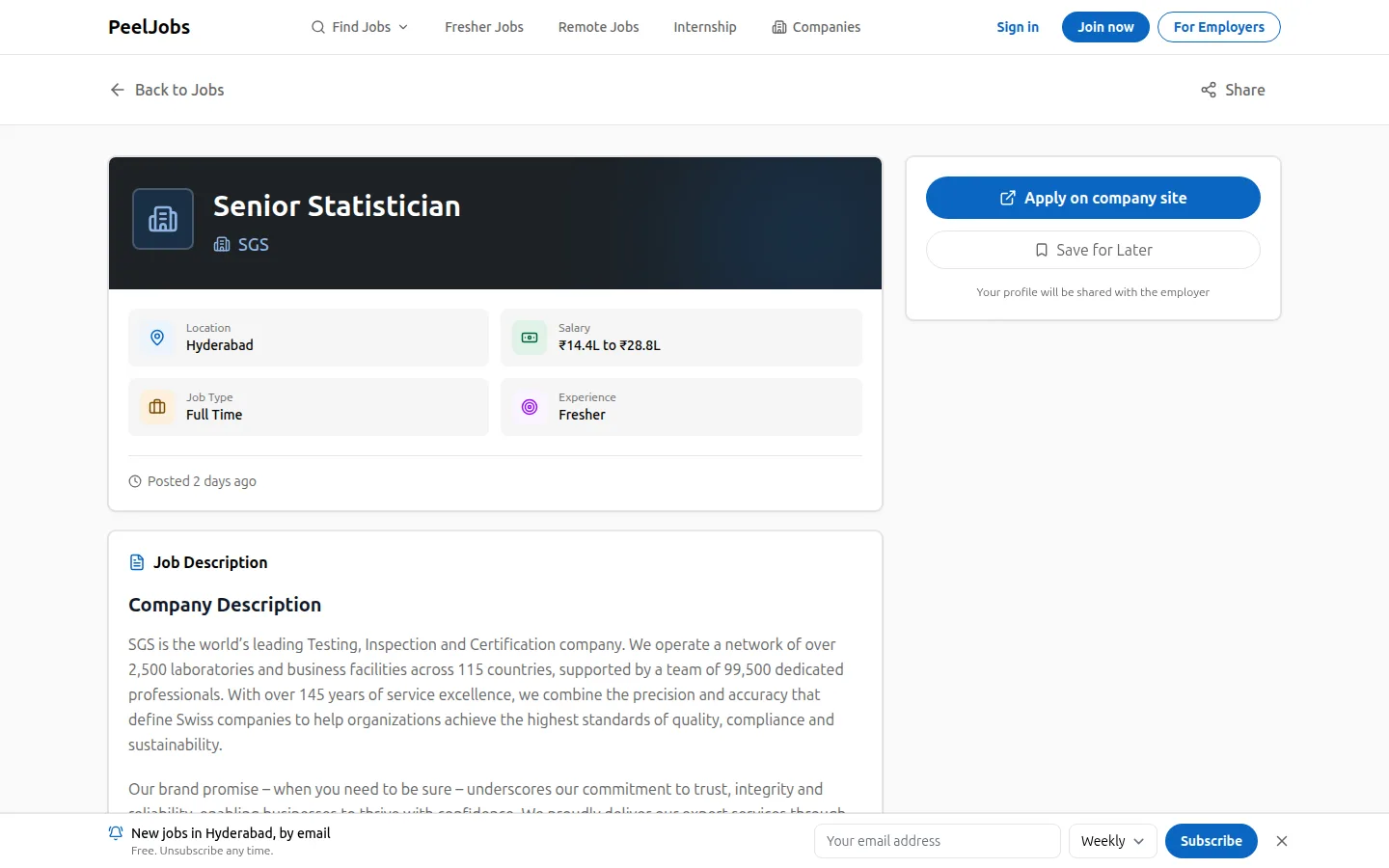
You do not have to take this on trust. peeljobs.com is JobClay’s own board, in India, on a complimentary plan. It runs in rupees with an Indian locale; its public pages show salaries in the compact rupee form (the screenshot at the top of this page, captured October 30, 2026, reads ₹14.4L to ₹28.8L) and a page for cities such as Chennai and Hyderabad.
A worked example
A jobs board for mining and resources work in Western Australia
Say you are a recruiter in Perth who knows the resources industry: geologists, mine planners, fly-in fly-out roles. A national site mixes them with every other job in the country. You want a jobs board for Western Australia, priced in Australian dollars.
In Region you choose Australia as the country, AUD as the currency, en-AU as the locale and Australia/Perth as the time zone. Because the board has a country, the source library opens on Australia when it has companies with open jobs there, and lists only those. A source you add can keep only jobs in your country, and a plain “Remote” with no place does not count as Australian, so those are left out.
Employers choose their cities from the places loaded from GeoNames, and each city a job names gets a page of its own, such as jobs in Kalgoorlie. For payment you write your bank details as transfer instructions and make one package in Australian dollars. An employer places an order, sees your instructions, pays from their bank, and you mark the order paid. The credits arrive and an invoice with its number is issued.
You set the tax name to GST and the rate to 10, choose whether prices include it, and add your business number to the invoices. Ask an accountant what you must charge; the board prints what you tell it.
The example cannot say how many employers will pay or how soon; that depends on your contacts.
What JobClay does for it
-
A country, currency, locale and time zone for each board
Four settings in the console decide how the board reads. The currency is a three-letter code and the locale a code such as en-IN or pt-BR. Once the board has a package, a job seeker Premium membership plan or an order, its currency cannot change.
-
Money, numbers and dates written your way
Salaries, prices and dates go through the board’s locale, currency and time zone, so a salary can read ₹12L or $120K. Amounts are kept in the currency’s smallest unit with its own number of decimals, so a yen has none and a rupee has two.
-
Bank transfer as a way to get paid
Employers can pay by bank transfer with no card involved. You write the instructions, the employer sees them on the order, and you mark it paid, which adds the credits and issues the invoice. Card payments go to your own Stripe account, and the payments page tells Indian operators that Stripe accounts in India are by invitation and that bank transfer always works.
-
A tax line and numbered invoices
Name your tax (GST, VAT or another), give a rate, and say whether prices include it. Invoices print your legal name, address and tax number under a label you choose, such as GSTIN, in a numbered series with your prefix.
-
Cities from your country
Places come from GeoNames: every country, region and city of a thousand people or more, shared by all boards. A search ignores accents, so “thane” finds Thāne, and each city gets a landing page, such as /jobs/in-hyderabad-telangana-india/.
-
Jobs from companies in your country
The source library opens on your board’s country when it has companies with open jobs there, and a source can keep only the jobs it places in that country.
-
Plans in US dollars, a board in yours
The first paid plan, Starter, is $49 a month. JobClay bills its own plans in US dollars, by card through Stripe, whatever currency your board uses. What your employers pay is a separate matter: that is in your board’s currency and goes to you.
Where JobClay is the wrong choice
- You need a board in two languages or two currencies. A board has one currency and one language, and its packages and wording are the same for every visitor. Visitors cannot switch between languages or pay in a currency of their choice.
- You need the console in your language, or JobClay’s plans in your currency. The console is in English, and JobClay bills its own plans in US dollars; only your board’s wording and prices follow your region.
- You need invoices that split a tax into parts, such as India’s GST into central and state shares, or that print a place of supply. An invoice shows one tax line with the name and rate you set; anything else goes in its footer.
How to start
- 1
Start a free board
Sign up with your email or Google, name the board and choose its address. It is live at once, on the Free plan.
- 2
Set your region first
In Region, choose the country, the currency, the locale and the time zone. Do it before you make a package, because the currency is fixed once there is one.
- 3
Decide how employers pay
Fill in your legal name and address, since employers cannot buy until they are there. Write your bank details as transfer instructions, set your tax name, rate and tax number, and connect Stripe if it is open to you.
- 4
Add companies from your country
Open the source library, which starts on your country when it has companies there, add companies with open jobs there, and let new jobs wait for your approval until you trust them.
Questions
Anything else? See the plans, or start a free board and look around.
Can I change the currency later?
Only until you have a package, a job seeker Premium membership plan or an order. After that the currency stays, because every price and invoice is in it. Choose it before you set a price.
Can employers pay in a different currency?
No. A board has one currency, and employers pay in it. If your Stripe account holds a different currency, the payments page warns you that Stripe may convert at its own rate. Card payments leave out a few currencies Stripe reads differently, such as the Icelandic krona; bank transfer is open for any currency.
Does the board speak my language?
It starts in English. From the console’s Texts page you can replace the words of the board’s pages and buttons with your own, and the numbers, dates and money follow your locale. There is one set of words for each board, with no language switch for visitors.
Do I need a Stripe account to get paid?
No. Bank transfer works without one, and you mark each order paid when the money arrives. Card payments need a Stripe account that Stripe is willing to open for you; the money goes straight to you, with no share to JobClay (Stripe’s own fees apply).
Is peeljobs.com really a JobClay board?
Yes. It is JobClay’s own board, in India, on a complimentary plan, so its limits are not the public plans’ limits.
Related
- Use cases How niche boards, newsletters, communities, local boards, staffing agencies and boards outside the US run on JobClay, and where it is the wrong choice.
- Niche job boards Start a niche job board on the Free plan, backfill it from companies’ hiring systems, keep only your niche’s jobs, and sell posts once employers come.
- Local job boards A local job board for a chamber of commerce, council or town group: approve employers against spam, a page for each town, free posts each month and job alerts.
- Staffing agencies Run a recruitment agency job board on your own domain: post clients’ jobs, ask screening questions, move applicants through stages, and export them as CSV.
- Payments Sell job posts to employers and a Premium membership to job seekers. Cards go into your own Stripe account, with no JobClay fee. Invoices are built in.
- Branding Give your job board your logo and colour, arrange its home page and menu, add pages and a blog, reword it and its emails, and use your own domain on paid plans.
Start your job board today
Free plan, no card needed.