 JobClay
Job feeds
How do I get my job board’s jobs onto Indeed, Jooble and Talent.com?
Job search sites such as Indeed, Jooble and Talent.com read job feeds: files of jobs at fixed addresses, fetched on their own schedule. Every JobClay board can publish one in each site’s format, plus an RSS feed of its newest jobs for newsletters, Zapier, Make and feed readers. You switch the XML feeds on, copy their addresses and send each to its aggregator, which decides for itself whether to list your jobs.
Every link in a feed leads to the job’s own page on your board, so more places showing a job means more visitors there.
Free plan, no card needed.
At a glance
| Addresses | /feeds/indeed.xml, /feeds/jooble.xml and /feeds/talent.xml on the board’s address, and /feed.xml for RSS. |
|---|---|
| Switched on | The XML feeds are off until you switch them on in the console. The RSS feed has no switch. |
| Which jobs | Live jobs open to everyone and not hidden from search, posted by employers or by you; imported jobs only if you include them. |
| How many | The newest 5,000 in each XML feed, and the newest 50 in the RSS feed. |
| Rebuilt | The XML feeds at most once every 10 minutes; each aggregator reads when it chooses. |
| Never in a feed | The address applications go to, anything about applicants, and a job while only Premium members can see it. |
| Plans | Every plan, the Free plan included. No plan changes what the feeds hold. |
Page updated .
Switch the feeds on and copy their addresses
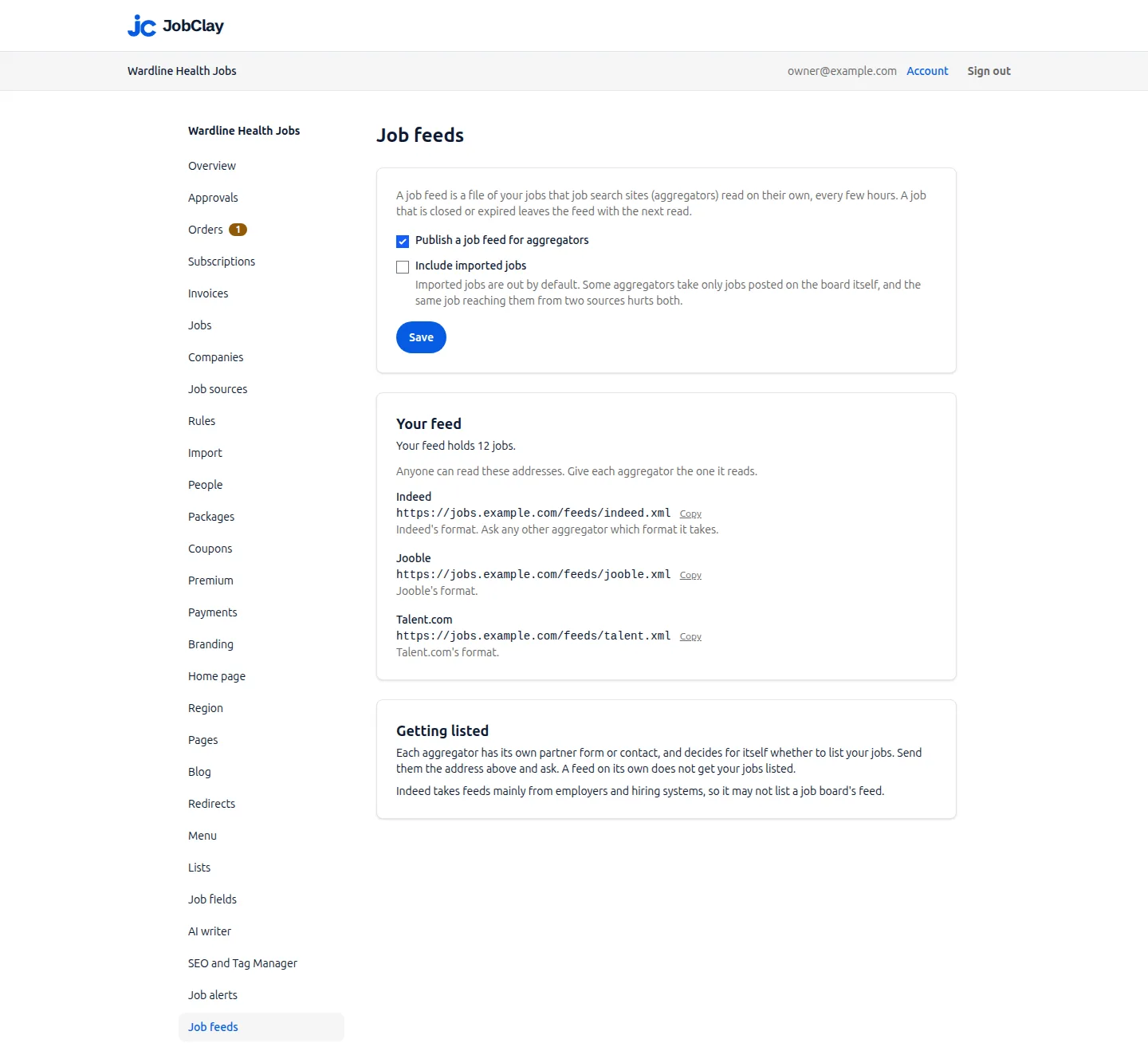
On the console’s Job feeds page, tick Publish a job feed for aggregators and press Save; the owner or any admin can. A Your feed card then shows how many jobs the feed holds and the three addresses, each with a Copy button.
Anyone can open them, so check each in a browser first. Untick the box and save, and after a short wait all three answer not found. Ask any other aggregator which format it reads.
Indeed      https://jobs.example.com/feeds/indeed.xml
Jooble      https://jobs.example.com/feeds/jooble.xml
Talent.com  https://jobs.example.com/feeds/talent.xml
RSS         https://jobs.example.com/feed.xml
Which jobs the XML feeds carry
The jobs your sitemap lists: live, open to everyone and not hidden from search. A job source set to Hide from search engines keeps its jobs out, and a job held back for Premium members joins once it opens to everyone. Of those, a feed takes what employers and you posted, most recently opened first, up to 5,000, and drops a job once it closes or expires.
Imported jobs stay out until you tick Include imported jobs. An aggregator may already have them from the company itself, so the same job would reach it twice, and Indeed does not allow aggregators, the sites that collect jobs from other websites.
What each format holds
Every job carries its title, company, place and full description, the day it opened and the day it expires, with its job type and salary where it has them. Salary appears only when the employer shows it, worded as on the job page, in your board’s currency.
- Indeed’s format: an entry per place, every element present even when empty, plus education, category, experience and fully or hybrid remote. The email element is always empty.
- Jooble’s format: one entry per job, its places in one region, dates as day, month and year between dots, and elements without a value left out.
- Talent.com’s format: an entry per place, as in Indeed’s, plus the company’s logo and a yes or no for remote work.
<job>
  <title><![CDATA[Staff nurse, night shifts]]></title>
  <date><![CDATA[2026-10-28T09:00:00Z]]></date>
  <referencenumber><![CDATA[4182]]></referencenumber>
  <url><![CDATA[https://jobs.example.com/job/staff-nurse-night-shifts-4182/?utm_source=indeed&utm_medium=job_feed]]></url>
  <company><![CDATA[Wardline Health]]></company>
  <city><![CDATA[Leeds]]></city>
  <country><![CDATA[GB]]></country>
  <email></email>
  <jobtype><![CDATA[fulltime]]></jobtype>
  <remotetype></remotetype>
</job>
What Indeed, Jooble and Talent.com say about taking a feed
Each aggregator decides for itself whether to list a board’s jobs; none promises to, and neither does JobClay. This is what each said on its own pages on October 30, 2026.
- Indeed: its help page on third-party recruiters and aggregators says aggregators, which collect jobs from other websites instead of posting original content, are not allowed; ad agency feeds may not carry jobs from job board clients, nor distributor feeds any job board content. It names no route for a job board’s own feed. Its XML feed reference asks each job for the email tied to the client’s Indeed account, which JobClay leaves empty, and says a crawled feed is refreshed four times a day.
- Jooble: its help centre lists an XML feed among the ways jobs reach Jooble, and says jobs on the job boards it indexes appear there by themselves. Its specification asks for the feed’s address, says its crawler reads a feed at least once every 24 hours, and indexes only jobs published less than 45 days before that first read. Its premium FAQ says it does not publish aggregated or low-quality content.
- Talent.com: its integration guide says it crawls the address you give it, and requires a reference number, title, company, city, state, country, posting date, link and a description of at least 50 characters matching the job’s page. It asks for salary in parts, where JobClay writes one line. Written for hiring systems, it names no form for job boards, so ask Talent.com where to send the address.
Sources
- Indeed: Third-Party Recruiters and Aggregators. Read on .
- Indeed: XML feed reference. Read on .
- Jooble: Why is partnership with Jooble useful, and what are the cooperation options. Read on .
- Jooble: XML Feed Specifications. Read on .
- Jooble: Premium Job Postings on Jooble, Frequently Asked Questions. Read on .
- Talent.com: Integration Guide. Read on .
The RSS feed: your newest jobs for any tool that reads RSS
Every board publishes an RSS feed at /feed.xml from its first day, with nothing to switch on: its 50 newest live jobs open to everyone. Jobs hidden from search stay out, but imported jobs are in, with no setting to leave them out. Its address, ready to copy, is on the console’s Job alerts page.
Three filters narrow it and combine. ?term= takes an active term’s slug from any of your lists, as its landing page uses it; ?place= takes a city, state or country slug; ?featured=true keeps only jobs featured now. An unknown slug answers not found, so open the address once before a tool relies on it.
Each item’s guid is the job’s own address, so a tool watching for new addresses sees each new job. The address follows the title, so a retitled job looks new to such a tool.
https://jobs.example.com/feed.xml
https://jobs.example.com/feed.xml?term=nursing
https://jobs.example.com/feed.xml?place=leeds
https://jobs.example.com/feed.xml?term=nursing&place=leeds
https://jobs.example.com/feed.xml?featured=true
Post new jobs from the RSS feed with Zapier or Make
JobClay has no step of its own in Zapier or Make, and needs none: both read RSS. Use the feed for what should follow a new job, such as a social post; for an application, use the board’s webhooks.
- Zapier: choose RSS by Zapier as the trigger with the New Item in Feed event, and paste the address into the Feed URL field. Zapier recommends its default, Different Guid/URL, which fires when a new address appears in the feed.
- Make: add the RSS app’s Watch RSS Feed Items trigger, enter the address and set how many items one run returns. Make warns that when more items appear between runs than a feed lists, the extra ones are missed. This one lists 50, so on a busy board run it often or filter the address.
Sources
- Zapier: Trigger Zap workflows from new RSS feed items. Read on .
- Make: RSS, Apps Documentation. Read on .
Set it up
- 1
Switch the feeds on
On Job feeds in the console, tick Publish a job feed for aggregators and press Save.
- 2
Decide about imported jobs
Leave Include imported jobs unticked unless an aggregator asks for them.
- 3
Send each aggregator its address
Use its own partner form or contact, give it the address in its format, and ask whether it will list the jobs.
- 4
Point your own tools at the RSS feed
Copy the address from the Job alerts page, add a filter if needed, and paste it into Zapier, Make or a newsletter tool.
- 5
See which aggregator sends visitors
In your analytics, look for utm_medium=job_feed; utm_source names the aggregator.
What it does not do
- JobClay does not submit the feeds or sign the board up with any aggregator, and cannot make one list your jobs.
- No paid campaigns: the feeds carry no bid, budget or sponsored flag. A paid job advertising service suits buying clicks better.
- The feeds carry no apply details, so every link leads to the job’s page on your board.
- One XML feed per aggregator for the whole board, which cannot be split by employer, list or place. Only the RSS feed takes filters.
Questions
Anything else? See the plans, or start a free board and look around.
Will Indeed list my job board’s jobs?
Nobody can promise that. Indeed’s help page, read on October 30, 2026, says it does not allow aggregators and keeps job board content out of agency and distributor feeds, and the console warns that Indeed may not list a job board’s feed. If you have a contact there, send the address with imported jobs left out.
Should I include imported jobs?
Usually not. Your board took them from other sources, such as hiring systems, careers pages and XML feeds, so an aggregator may have them already, and Indeed describes collecting jobs from other websites as what an aggregator does. Include them only for an aggregator that asks.
How soon does a new job reach an aggregator?
A new job joins the feeds within 20 minutes: each feed is rebuilt at most once every 10 minutes, and the site keeps the file it serves for up to 10 minutes more. Each aggregator then reads on its own schedule: Jooble’s specification says at least once every 24 hours, Indeed’s reference four times a day, and Talent.com’s guide names no interval.
Can I send an aggregator only some of my jobs?
Not through the XML feeds, which hold every job that qualifies, up to the newest 5,000. The RSS feed narrows to one term, one place or the featured jobs.
Related
- Integrations The connections a JobClay board has: your website and domain, jobs in from hiring systems and feeds, jobs out to aggregators and Google, payments and webhooks.
- XML feeds and careers pages Fill your job board from an XML feed, in Indeed’s format or mapped field by field, or from the JobPosting data on a company’s own careers pages.
- Webhooks JobClay webhooks post six board events to a Zapier or Make step or your own code, signed with Standard Webhooks and retried for days. Events, payloads, setup.
- Your website Add a job board to your website without a plugin: run it on jobs.yoursite.com and link it from your WordPress, Squarespace or Wix menu. Steps and DNS records.
- Newsletters Give your newsletter a job board: a feed for a jobs section, packages employers buy into your own Stripe account, and weekly alerts. No native newsletter link.
- SEO Job pages carry the data Google reads, new jobs reach IndexNow in minutes, and cities and remote work get landing pages. Sitemaps and redirects are built in.
Start your job board today
Free plan, no card needed.