 JobClay
Webhooks
How do I send new jobs, applications and paid orders to Zapier, Make or my own code?
A webhook lets your board tell your other tools what just happened. Give the console an https address, tick the events it should hear about, and the board posts each one there within minutes. The address can be your own code, or a step in Zapier or Make whose later steps write to a channel, a sheet or a CRM. JobClay has no step of its own in either tool: you start from their catch-hook step, as below.
Webhooks come with every plan, the Free plan included: up to 10 addresses a board, each with its own events, secret and log.
Free plan, no card needed.
At a glance
| Events | Six: job published or closed, application received, employer signed up, order paid, job alert confirmed. |
|---|---|
| Addresses | Up to 10 a board, on every plan, the Free plan included; https on port 443, public hosts only. |
| Signatures | Standard Webhooks headers, with an HMAC-SHA256 signature from each address’s own secret. |
| Delivered when | Your address answers any 2xx status within 15 seconds; redirects are not followed. |
| Retries | 10 attempts over about 3 days, then marked failed; you can resend it while the address is active. |
| Turned off | At once on a 410 answer, or after 3 days of failed attempts, until you resume it. |
| Managed by | The board’s owner, on the console’s Webhooks page. |
Page updated .
Which events fire, and when
Applications, sign-ups, paid orders and confirmed alerts are queued as they are saved; a change rolled back sends nothing. Job events come from a comparison, every 2 minutes, of the board’s public jobs with the list kept last time. A board’s first address for job events starts with the next change, not with the jobs already public. Imported jobs’ events go only to addresses with Include imported jobs ticked.
- Job published: a job becomes public, when it is published or approved, renewed, shown in search again, or opened to everyone after Premium early access.
- Job closed: a public job leaves, with its reason: expired, closed, unlisted or deleted. A deleted job’s event keeps only its id, title, link, origin and reason.
- Application received: someone applies on the board. A job that sends seekers to apply at its source, as an imported job does, sends nothing.
- Employer signed up: a new employer confirms their email address, through the sign-up link or a first password reset, signs up with Google, or accepts an invitation; with whether the account waits for your approval.
- Order paid: an order paid by card, marked paid after a bank transfer, renewed by a subscription, or placed with nothing to pay.
- Job alert confirmed: a visitor confirms an alert from its email, with its frequency and filters.
What an event carries, and what it leaves out
Each body is one JSON object: the event’s id, type and time, whether it is a test, your board’s name and address, and the data. Times are UTC in ISO 8601, and most events link to the console or employer page where you act on them.
An application brings the applicant’s name and email, their screening answers and whether they meet the job’s requirements; an order brings its numbers, how it was paid, the package and what it gave, every amount and the billing contact. No event carries a job description, resume, cover note, phone number, IP address or browser, and deleting someone’s account deletes logged deliveries holding their email.
{
  "id": "evt_3fdecfe23dfb7638f2cd549b1e8de3a9",
  "type": "order.paid",
  "timestamp": "2026-10-29T10:30:02Z",
  "test": true,
  "board": {
    "name": "Example Jobs",
    "url": "https://jobs.example.com"
  },
  "data": {
    "id": 512,
    "number": 1042,
    "invoice_number": "INV-1042",
    "renewal": false,
    "method": "card",
    "product_name": "Five job posts",
    "post_credits": 5,
    "featured_credits": 1,
    "featured_company_days": 30,
    "currency": "INR",
    "amounts": {
      "list": "10000.00",
      "discount": "1000.00",
      "net": "9000.00",
      "tax": "1620.00",
      "total": "10620.00"
    },
    "coupon_code": "LAUNCH10",
    "buyer": {
      "company": {"id": 87, "name": "Example Labs"},
      "name": "Example Labs Private Limited",
      "email": "billing@example.com"
    },
    "paid_at": "2026-10-29T10:30:00Z",
    "console_url": "https://jobclay.com/console/example/orders/512/"
  }
}
Check that a request came from your board
Requests are signed the Standard Webhooks way. The webhook-id header is the event’s id, the same on every attempt and at every address; webhook-timestamp is when this attempt left, in Unix seconds; webhook-signature is v1, a comma and a base64 HMAC-SHA256 of the id, the timestamp and the body joined by full stops, keyed with the decoded base64 that follows whsec_ in your secret.
Check it over the raw body as it arrived, not over JSON you parsed and wrote again, and compare in constant time. The specification also asks you to refuse timestamps far from your own clock, against replays, and to skip a webhook-id already handled. Its site lists reference libraries for Python, JavaScript, Go, PHP and other languages.
The secret shows once, when you add the address. After Rotate secret the old one keeps signing for 24 hours, so the header carries two signatures, newest first, and either secret still matches.
content-type: application/json
user-agent: JobClay-Webhooks/1.0 (+https://jobclay.com)
webhook-id: evt_3fdecfe23dfb7638f2cd549b1e8de3a9
webhook-timestamp: 1793269802
webhook-signature: v1,/MBnzrNliMdmIrz93t1VZbO9MDRL3SkcSMvwl9HD2gk= v1,oF0iS9+6qdGU9HSgMvzvD2nS7l4QMJ2YMo0kq1y1JBM=
Sources
- Standard Webhooks: the specification. Read on .
- Standard Webhooks: webhook resources. Read on .
Retries, turn-offs and the delivery log
Any 2xx answer within 15 seconds is a delivery, so answer before any slow work. A redirect fails like a timeout or any other status, and JobClay then waits 1 minute, 5 minutes, 30 minutes, 2 hours, 5 hours, 10 hours, 14 hours, 20 hours and 24 hours between tries, 10 attempts in all. Each failure also holds the whole address back for 1 minute. A retried event then waits out its own, longer step while newer events come due and go first, so it can arrive after them.
A 410 Gone answer turns the address off at once, and so do 3 days of failures with nothing delivered. Then, as after Pause, it gets no new events and its waiting deliveries fail, until you press Resume.
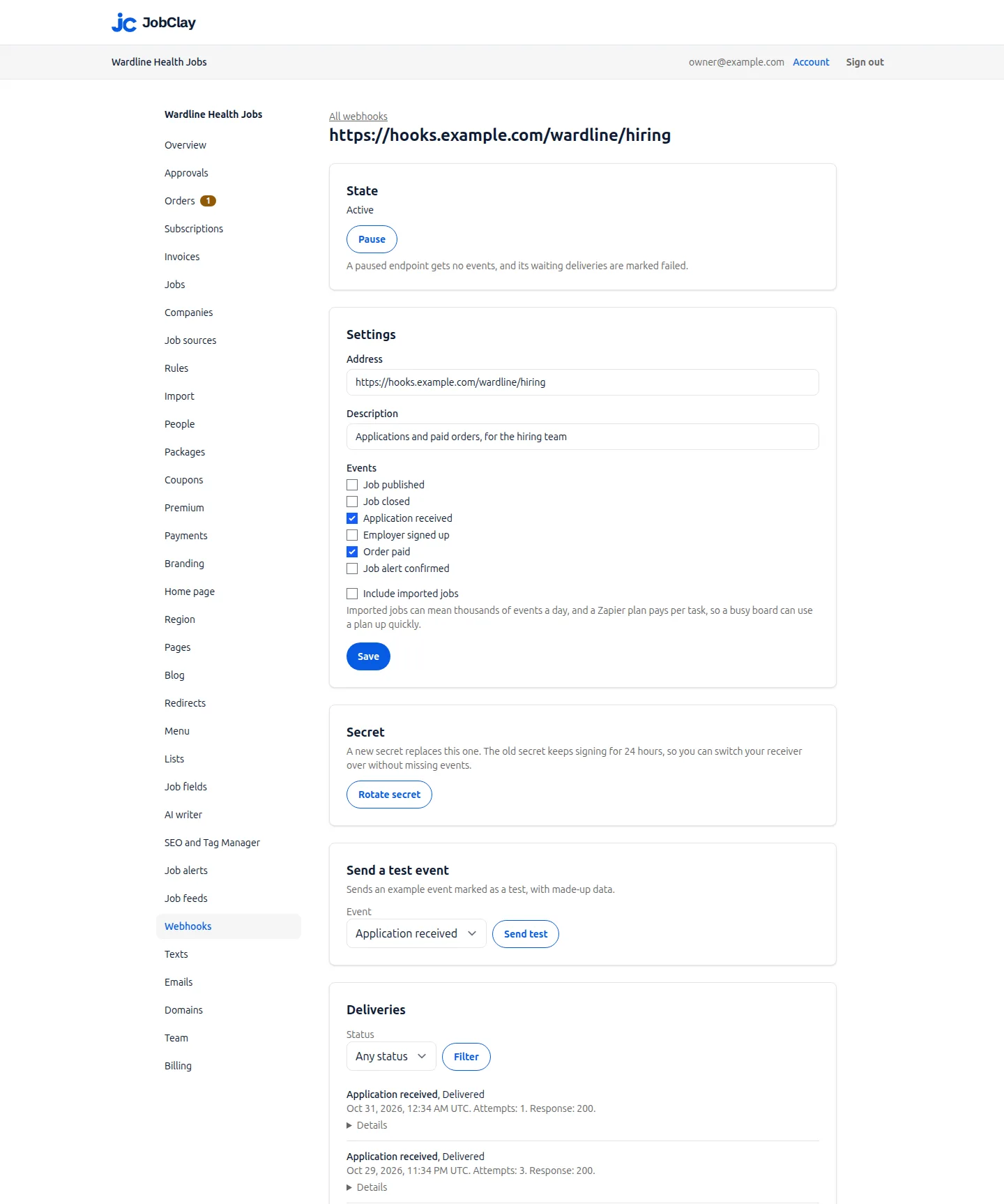
Each address’s page logs its deliveries, newest first, with a status filter: the event, attempts, next attempt, your status code and any error, with your answer’s start and the body it sent, indented for reading, under Details. A failed delivery shows Resend while the address is active. The log keeps each delivery for 30 days.
Example: applications into a sheet, through Zapier
In a new Zap, choose Webhooks by Zapier in the Trigger step, set Event to Catch Hook and press Continue; leave Pick Off A Child Key empty to keep the type and test fields. The Test tab then shows the webhook URL: press Copy.
In the console, paste it as the Address under Add endpoint, tick Application received and add it. Send an Application received test event from the address’s page, then press Test trigger: the example applicant’s name, email and answers become fields for the step that adds the row.
A live Zap answers each request with a 200 you cannot change. A Zap turned off or deleted answers 404, which Zapier says can take up to several hours to begin, so pause the address when you turn the Zap off. Catch Raw Hook adds the headers, webhook-id included, but leaves the body unparsed. Zapier’s page lists Webhooks by Zapier on its Professional, Team and Enterprise plans, not Free.
Sources
- Zapier: Trigger Zap workflows from webhooks. Read on .
Example: paid orders into a CRM, through Make
In Make’s Scenario Builder, add the Custom webhook module, click Add beside the Webhook dropdown, fill in Webhook name and click Save. Copy the unique URL Make creates, and run the scenario so the module waits for a call.
Add the URL in the console with Order paid ticked and send that test event. Make learns the data structure from it, so the buyer, invoice number and amounts map into your CRM module; if fields change, click Detect new values and test again.
Without a Webhook response module, Make answers 200 Accepted as a request joins its queue, or 400 Queue is full, which JobClay retries. With one, Make allows up to 180 seconds to answer; past 15 seconds, JobClay counts a failure and sends again. Turn on Get request headers to map webhook-id. JobClay sends no x-make-apikey header, so leave API Key authentication empty.
Neither help page shows a way to check webhook-signature, so either step runs on any request to its URL. Keep the URL private, and send events you must trust to your own code that checks the signature.
Sources
- Make: Webhooks. Read on .
- Zapier: Trigger Zap workflows from webhooks. Read on .
Set it up
- 1
Make the receiving end
A Zapier Catch Hook, a Make Custom webhook, or a route of your own that takes a POST; copy its https address.
- 2
Add the address
Under Webhooks in the console, paste it, tick its events and press Add endpoint.
- 3
Keep the secret
It shows once. Store it where your code reads it, or rotate it if it is lost.
- 4
Send a test event
On the address’s page, pick one of its events and press Send test, then map its fields into your next step.
- 5
Watch the first deliveries
Open the address’s Deliveries after the first real events, fix any failure and press Resend.
What it does not do
- Six events only: nothing is sent when a job is edited, an application changes status, a job seeker signs up or an order is refunded.
- Webhooks only send: JobClay has no API, so no step can write back to the board.
- JobClay has no step of its own in Zapier or Make, and no Slack app or Discord bot.
- You choose the events, not their fields or headers.
- No email says an address was turned off; its state on the Webhooks page does.
Questions
Anything else? See the plans, or start a free board and look around.
Do I need a developer to use webhooks?
Not for Zapier or Make: you paste an address and map fields. Code is needed only for a server of your own, or to check signatures.
Can the same event arrive twice?
Yes. An answer lost or too late counts as a failure, so the event comes again, as it does after a resend. Every copy keeps its webhook-id: skip ids you have handled.
Will a test event reach my channel?
Yes: it is signed, retried and logged like any other, with "test": true and example data. Remove what your step wrote, or have it check that field.
Related
- Integrations The connections a JobClay board has: your website and domain, jobs in from hiring systems and feeds, jobs out to aggregators and Google, payments and webhooks.
- Stripe and bank transfer Employers pay for job posts by card into your own Stripe account, or by bank transfer you mark paid. JobClay takes no share and invoices every paid order.
- Job feeds Send your board’s jobs to Indeed, Jooble and Talent.com through XML feeds, and to Zapier, Make or a newsletter through RSS: what each holds, how to send it.
- Your website Add a job board to your website without a plugin: run it on jobs.yoursite.com and link it from your WordPress, Squarespace or Wix menu. Steps and DNS records.
- Slack and Discord communities Run a job board for your Slack or Discord community: employers post and pay, you approve, and each new job can reach a channel through a Zapier or Make step.
- Employers Employers get company profiles, rich-text job posts, applicant stages, private notes, CSV export and teams, in their own area of your job board.
Start your job board today
Free plan, no card needed.