 JobClay
Stripe and bank transfer
How do I charge employers for job posts, and keep what they pay?
Connect your own Stripe account from the console, and employers who buy a package pay on Stripe’s checkout page, straight into that account. JobClay attaches no application fee, so a payment reaches you less only Stripe’s own fees on your account. Where cards will not do, employers pay by bank transfer to the details you write, and you mark the order paid. Either way JobClay adds the employer’s credits and issues a numbered invoice in your name.
Free plan, no card needed.
At a glance
| Where card payments go | Your own Stripe account, as a charge made on it, with no application fee. |
|---|---|
| What JobClay charges | Your JobClay plan, and nothing per sale: the Free plan costs nothing, and paid plans start at $49 a month. |
| Plans | Every plan, the Free plan included. No plan limit applies to selling. |
| Ways to pay | Card on Stripe’s checkout page, bank transfer you mark paid, or both. Subscriptions are card only. |
| Seller details | Your legal name and address, under Invoice details: the shop takes no order until both are in. |
| Without Stripe | Bank transfer works with no Stripe account, for one-off packages. |
Page updated .
Connect your own Stripe account
On the console’s Payments page, the board’s owner presses Connect Stripe. JobClay asks Stripe for a new account under the email you sign in with, using Stripe’s own defaults and no country, and sends you to Stripe’s hosted onboarding. There you pick the country and give Stripe what it asks for: every detail it will eventually need, not only those due today. Stripe, not JobClay, checks them.
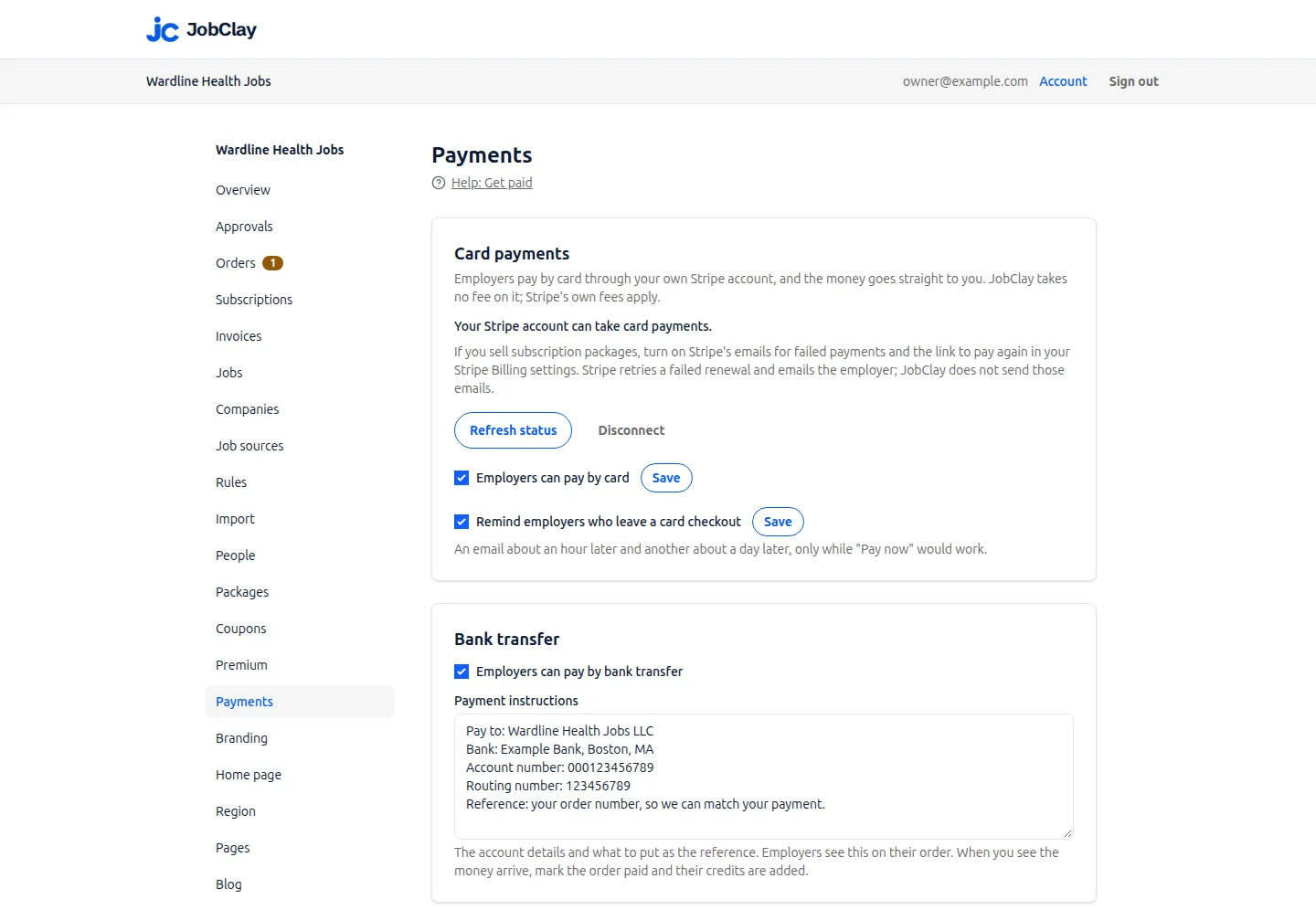
Stripe then sends you back to Payments, which reads the account’s state and keeps it current from Stripe’s events. Once the line under Card payments says your account can take card payments, tick Employers can pay by card and save it.
You copy no API key and add no webhook in Stripe: Stripe Connect sends the account’s payment events to JobClay.
What one card order puts in your Stripe account
When an employer pays by card, JobClay opens a Stripe checkout on your account, priced in your board’s currency and with no application fee. It takes cards only and asks for a billing address.
Once Stripe reports the payment, the order takes Stripe’s own amounts, so the invoice matches the charge. The credits are added, the invoice is issued, and an order.paid event goes to each webhook address set to receive it. A job published with a paid credit goes live even when the board is at its live-job limit.
An unpaid checkout expires after 31 minutes and cancels its order. Remind employers who leave a card checkout, on by default, then emails them a link to pay again, about an hour and again about 24 hours after they placed the order. Refunds start in your Stripe Dashboard: when Stripe reports one, or a lost dispute, JobClay issues a credit note and takes back the unused credits.
Checkout         one payment, cards only, billing address required
Line             Starter pack, in your board’s currency
Payment          Order 1042, tagged with the order and board
Tax rate         your tax line, when you set a rate
Coupon           one for each of your codes paid by card
Application fee  none
Subscriptions renew through Stripe Billing
A monthly or yearly package is sold by card alone, so employers see it only while your board takes cards. Each renewal Stripe collects on your account becomes a paid order of its own, with fresh credits and an invoice; one it has not collected grants nothing while Stripe retries it.
The retries are Stripe’s, set in your Dashboard under Billing, Revenue recovery, Retries. Also turn on Send emails when card payments fail, with its link to a Stripe-hosted page: Stripe then emails the employer after each failed attempt, and on that page they can change the card and pay what is due. JobClay sends no failed-payment emails.
Stripe does not retry some payments, among them cards issued in India and payments of a disconnected Connect account, and your Stripe settings decide what happens after the last retry.
Sources
- Stripe: Automate payment retries. Read on .
- Stripe: Automate customer emails. Read on .
Take bank transfers and mark them paid
Bank transfer needs no Stripe account. Tick Employers can pay by bank transfer and write your payment instructions, the account details and what to put as the reference; the switch will not save without them. Employers see them on their order, beside its number and total.
The order waits under Orders as Awaiting payment. When the money arrives, open the order, add a note if you like, press Mark paid and confirm: the credits are added once and the invoice is issued. Any admin can do this; only the owner changes the Payments page.
A transfer that never comes is cancelled from the same page. One marked paid by mistake takes a credit note, which removes the unused credits.
Pay to     Example Jobs Ltd
Account    12345678 at Example Bank
Reference  your order number
Questions  billing@example.com
Where Stripe does not operate
Stripe’s global availability page lists the countries and regions it supports, with more to come, and says a business in one of them can sell to customers anywhere. It marks India and Indonesia as Preview, both entries leading to Stripe’s sales team rather than a sign-up. Côte d’Ivoire, Ghana, Kenya, Nigeria and South Africa are listed as its Extended network, and their entries link to paystack.com, not to a Stripe sign-up. The page defines neither label.
JobClay connects a Stripe account and nothing else, so where Stripe will not open one for you, run the board on bank transfer alone: employers buy one-off packages and you mark each paid. Subscription packages stay hidden and job seeker Premium cannot be switched on, since both need a card. Until its account is ready, a board priced in Indian rupees is told on its Payments page that Stripe India is by invitation only and that bank transfer always works. Cards are also off for boards priced in Icelandic króna or Ugandan shillings.
Sources
- Stripe: Global availability. Read on .
An invoice in your name, either way
Every paid order gets one invoice, whether paid by card, by transfer or with a coupon that takes the whole price. Until Legal name and Legal address are filled in under Invoice details, employers cannot place an order and no order can be marked paid.
Invoices are numbered from your prefix in a sequence that never restarts, dated in your board’s time zone and formatted for its locale. Each keeps the details it was issued with, says how it was paid, and never changes: a correction is a credit note. Employers download theirs from the employer area.
Invoice  INV-000042
Seller   your legal name, address and tax ID
Buyer    the name, address, email, country and tax ID the employer gave
Line     Starter pack: 3 job posts for 30 days each
Tax      your tax line, at your rate
Paid     Paid by card, or Paid by bank transfer, with the day
Footer   anything you add, such as a reverse charge note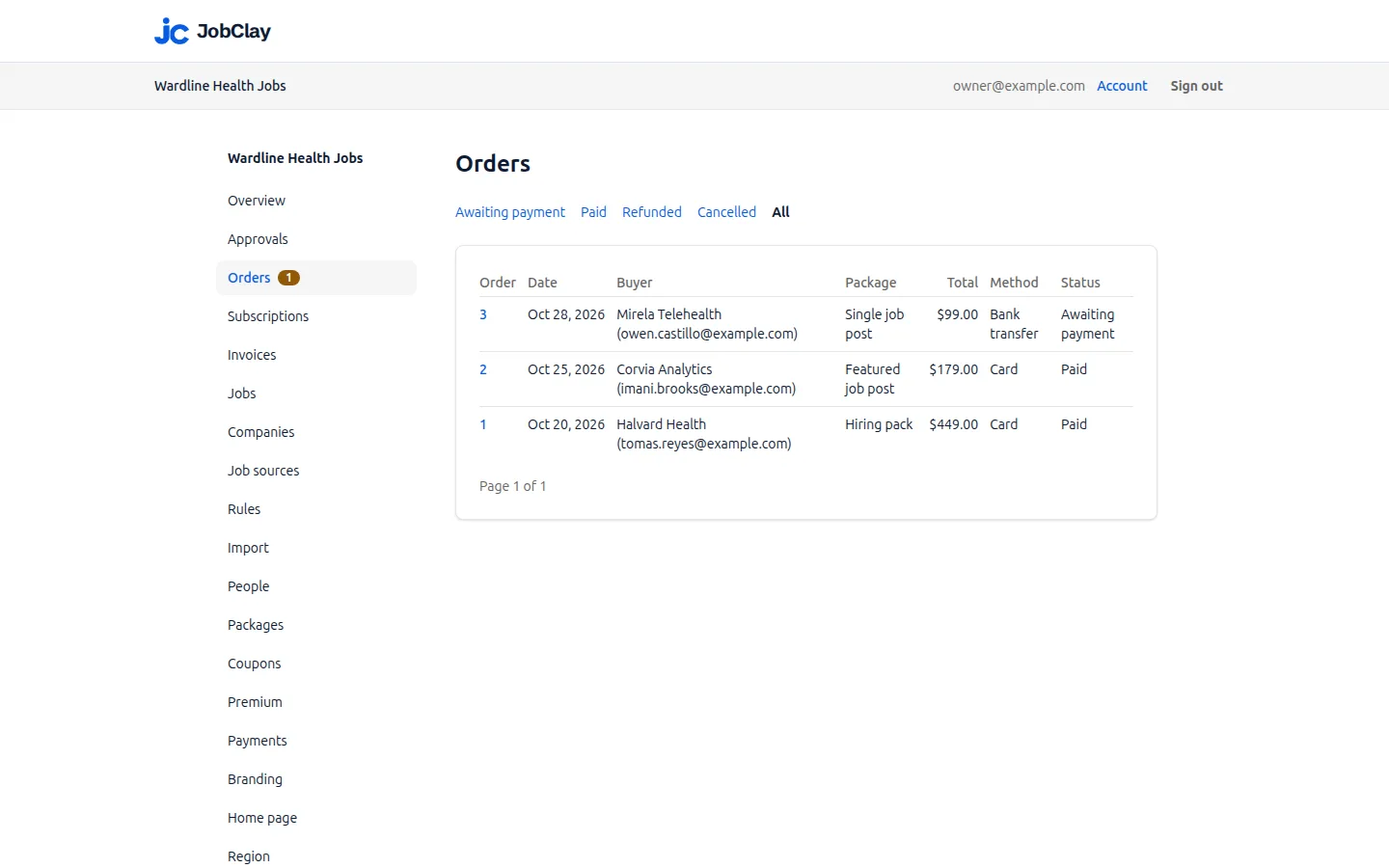
Set it up
- 1
Fill in your invoice details
On Payments, under Invoice details, enter your legal name and address and press Save. Employers cannot buy until both are there.
- 2
Price your packages
Set the board’s currency on the Region page, then add packages on the Packages page. The currency locks once a package exists.
- 3
Connect Stripe
Under Card payments, press Connect Stripe and finish Stripe’s onboarding, then wait until Payments says your account can take card payments.
- 4
Switch cards on
Tick Employers can pay by card and press the Save beside it.
- 5
Add bank transfer
Tick Employers can pay by bank transfer, write your instructions and press Save at the foot of the page.
- 6
Turn on Stripe’s failed payment emails
If you sell subscription packages, switch on Send emails when card payments fail in your Stripe Dashboard, with its link to a Stripe-hosted page where employers pay again.
What it does not do
- JobClay’s Stripe checkout takes cards only: bank debits and Stripe’s other methods that are not cards are not offered, and there is no PayPal.
- JobClay cannot see your bank account. You check that each transfer arrived and mark its order paid yourself.
- Credits arrive only once an order is paid, so JobClay cannot sell job posts on credit terms; an invoicing tool that bills first suits that better.
- JobClay does not work out, collect or file the tax you owe: each invoice carries the one tax line you set.
Questions
Anything else? See the plans, or start a free board and look around.
Does JobClay take a share of what employers pay?
No. Every checkout JobClay opens is a charge on your own Stripe account with no application fee, so the money lands in your Stripe balance less only Stripe’s own fees. Bank transfers never pass through JobClay. What you pay JobClay is your plan.
Can I connect a Stripe account I already have?
No. Connect Stripe makes a new Stripe account for the board, which you complete in Stripe’s onboarding. That account is yours: disconnecting the board does not close it, and its balance and history stay with you.
Do employers need a Stripe account to pay?
No. They type a card into Stripe’s checkout page, and the card details go to Stripe, never to JobClay. Subscribers change their card or cancel on Stripe’s billing page, from their employer dashboard.
What happens if I disconnect Stripe?
Open card orders are cancelled, but a one-off order Stripe reports paid is marked paid, and one it cannot confirm stays open for you. Renewing subscriptions are set to cancel at the end of their paid period, any Stripe refuses are listed for you to cancel in Stripe, and Premium is switched off. Connecting again makes a new account, so those subscriptions do not come back.
Can employers pay in another currency?
No. A board has one currency, and its packages, checkouts and invoices all use it. If your Stripe account’s own currency differs, the Payments page says so, and employers still pay in the board’s.
Can an employer get an invoice before paying a transfer?
No: an invoice is issued only for a paid order. Before paying, the employer has the order page, with its number, price, tax, total and your instructions.
Related
- Integrations The connections a JobClay board has: your website and domain, jobs in from hiring systems and feeds, jobs out to aggregators and Google, payments and webhooks.
- Webhooks JobClay webhooks post six board events to a Zapier or Make step or your own code, signed with Standard Webhooks and retried for days. Events, payloads, setup.
- Your website Add a job board to your website without a plugin: run it on jobs.yoursite.com and link it from your WordPress, Squarespace or Wix menu. Steps and DNS records.
- Payments Sell job posts to employers and a Premium membership to job seekers. Cards go into your own Stripe account, with no JobClay fee. Invoices are built in.
- Help: Get paid Sell job posts and a Premium membership on your board: packages, subscriptions, coupons, cards into your own Stripe account, bank transfers, tax and invoices.
- Job boards outside the US Start a job portal or jobs board in your own country: salaries and prices in your currency, local dates, bank transfer, a tax line and cities from your country.
Start your job board today
Free plan, no card needed.