 JobClay
Lever
How do I fill my job board with jobs from Lever?
Companies that hire with Lever publish their open roles on a public job board at jobs.lever.co, or at jobs.eu.lever.co when they are on Lever’s EU instance. Add that board to JobClay as a job source and its postings become jobs on your board, read on the schedule you set and closed when the company takes them down. JobClay reads the postings through Lever’s public postings API and does not sign in to the company’s Lever account.
Lever’s postings do not name the company, so you type its name once when you add the source. Companies added from JobClay’s source library arrive with theirs filled in.
Free plan, no card needed.
At a glance
| What you enter | The site name, such as acme, or its board address; the US or EU host; and the company’s name, unless a pinned company stands in. |
|---|---|
| What arrives | Title, description with its lists, locations, work mode, the commitment as a job type, the created date, and any yearly or monthly pay. |
| Entry level | Lever postings carry no level. A rule marks entry level jobs by their title or their commitment. |
| How often | Every hour, day or week, as you pick; new sources start on daily, and Run now reads straight away, though not twice within 10 minutes. |
| When a job closes | When a clean run no longer finds the posting and no other source lists it. A site that suddenly lists nothing must read empty 3 runs in a row, spanning 24 hours or more, before its jobs close. |
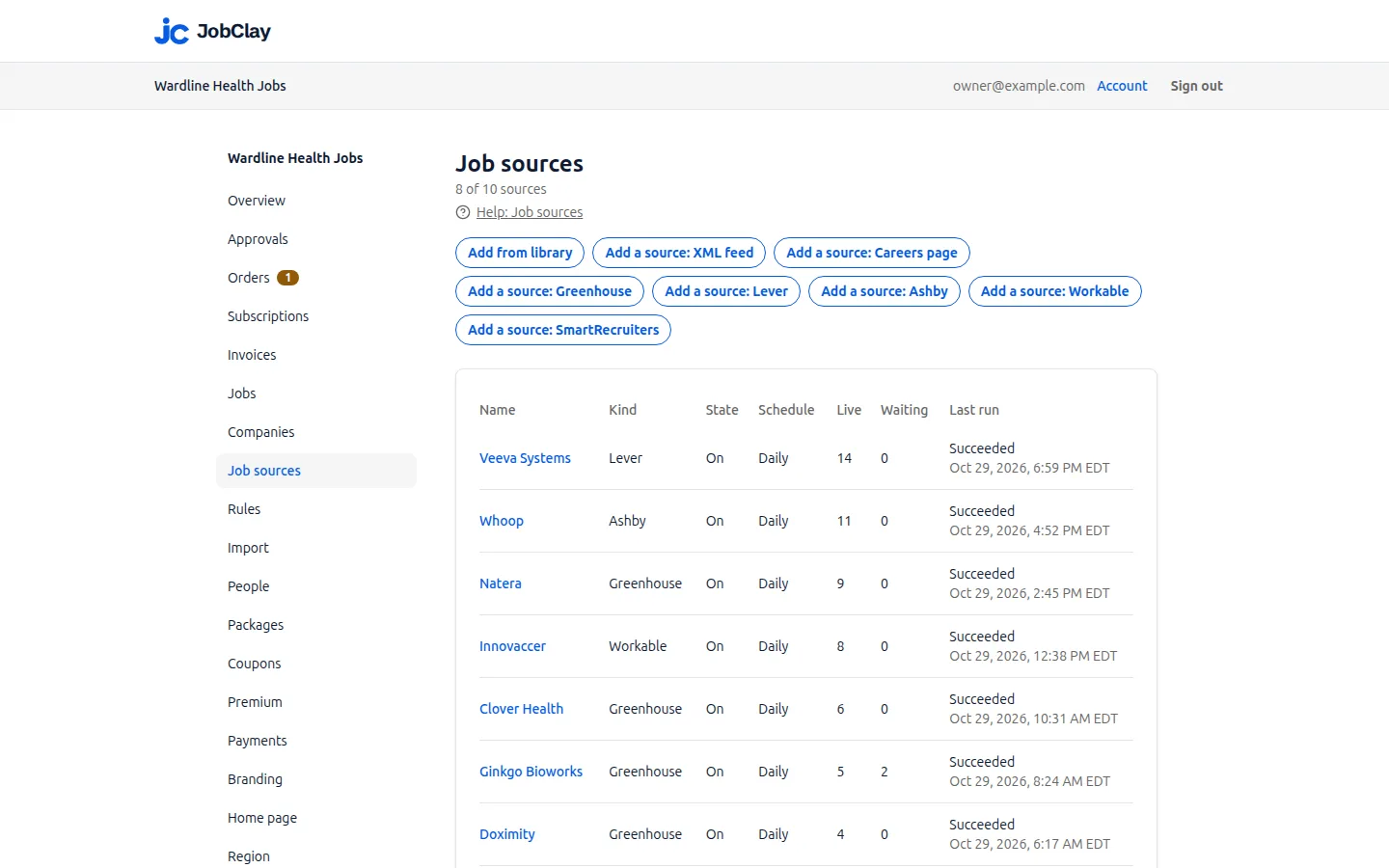
| Job sources | One job source per Lever site. Plans allow 1 on Free, 3 on Starter, 10 on Growth and 30 on Scale. |
Page updated .
US or EU: the Lever host a company is on
Lever’s postings API documentation names two instances, global (the default) and EU. A company’s job board address tells you which it is on: jobs.lever.co/acme is global, which JobClay’s form calls US, and jobs.eu.lever.co/acme is EU. JobClay reads the matching API, api.lever.co or api.eu.lever.co.
Paste the whole address into Board name and JobClay takes the host from it. Type only the name and choose US or EU under Lever host; choosing neither means US. A host that contradicts the pasted address is refused.
When a host has no site by that name, the run fails, says Lever has no site named and the name, and closes nothing until you correct the source.
https://jobs.lever.co/acme
  site acme, US host
https://jobs.eu.lever.co/acme
  site acme, EU host
acme
  site acme, the host you pick, else US
Sources
- Lever: Postings API. Read on .
The company name a Lever source needs
A Lever site belongs to one company, but none of the fields Lever documents for a posting is a company name. So a Lever source asks for one in Company name, and every job from the site carries it.
JobClay files the jobs under the company of that name on your board, one already there or a new one. To use a company you already have under another name, pin it under Company and leave the name empty; when both are set, the pinned company is used.
Without a name or a pinned company, the add form stops and asks for one. A company added from the source library skips this, because its library entry carries the name.
Sources
- Lever: Postings API. Read on .
What each Lever posting becomes on your board
JobClay reads a Lever site in one request and makes each posting a job:
- Title: the posting’s name.
- Description: Lever’s description, then each list, such as requirements or benefits, under its own heading, then the closing text.
- Places: every location the posting lists, matched to your board’s cities; a place that names no country takes the country code Lever gives the posting.
- Work mode: the workplace type, on-site, hybrid or remote. Left unspecified, a Remote or Hybrid word in the location decides, and otherwise the job is in-office.
- Job type: the commitment, such as Full-time, Part-time, Intern or Contract, picks the term of your job type list whose Job posting type matches it on the Lists page.
- Posted date: when the posting was created, while Use the posting date from the source is on; otherwise the day JobClay first imported it.
- Apply: Lever’s hosted application form for the posting.
- Source fields: team, department, commitment and location, for rules.
Sources
- Lever: Postings API. Read on .
Lever pay ranges, and why the interval matters
A posting may carry a salary range with a currency, an interval, and a lowest and highest amount; Lever’s documentation marks the range optional.
JobClay reads the interval’s unit, per year, month, week, day or hour, while your board shows pay by the year or the month. A yearly or monthly range in your board’s currency, the one on the console’s Region page, goes on the job; an hourly, daily or weekly wage, or a range in any other currency, is left off. A range with only one end set is kept as that single figure.
currency  EUR
interval  per-year-salary
min       52000
max       64000
  kept: 52000 to 64000, by the year
interval  per-hour-wage
  left off: the board shows pay by the year or the month
Sources
- Lever: Postings API. Read on .
Lever has no entry level field: mark entry level jobs with a rule
Nothing in a Lever posting says a role is for someone starting out, so Lever jobs arrive unmarked and stay out of your board’s entry level filter until a rule on the Rules page marks them.
A title rule finds roles named for beginners. The commitment finds interns: an Intern commitment can already set your internship job type, but job type and entry level are separate, so a second rule reading the commitment field puts interns in the filter too. Under Source, limit a rule to one Lever site or leave Any source.
Rules and the job type mapping act as a run imports a posting. A rule made after a site’s first run reaches its jobs through Re-apply to existing jobs, and only the live ones: a job waiting for room or for your approval keeps no mark until its Lever posting changes, or until it is live and Re-apply runs again. Re-apply never sets a job type from the mapping, so map commitments before the first run too.
When the title has new grad or graduate or junior or trainee, from acme (Lever): mark it as entry level
When the commitment field has Intern or Internship, from acme (Lever): mark it as entry level
Sources
- Lever: Postings API. Read on .
What closes a Lever job, and what brings it back
When the company fills or pulls a role, its posting leaves the site and the next clean run closes the job, unless another source still lists it. A job that had been live closes as expired and keeps its page; one that never went live is taken off. If the posting returns, so does the job.
A run that cannot reach Lever closes nothing, and nor does one empty read: a site that suddenly lists no postings closes its jobs only after 3 runs in a row find it empty, the first at least 24 hours before the last.
Every Lever site you add takes one of your plan’s job sources, and the plans allow 1 on Free, 3 on Starter, 10 on Growth and 30 on Scale. Delete a source and its live and waiting jobs close with it, unless another source lists them too.
Set it up
- 1
Find the site
Open a job from the company’s careers page. An address on jobs.lever.co or jobs.eu.lever.co names the site right after the host.
- 2
Map commitments to job types
On Lists, open your job type list and give each term its Job posting type, such as Full-time or Intern.
- 3
Add the site switched off
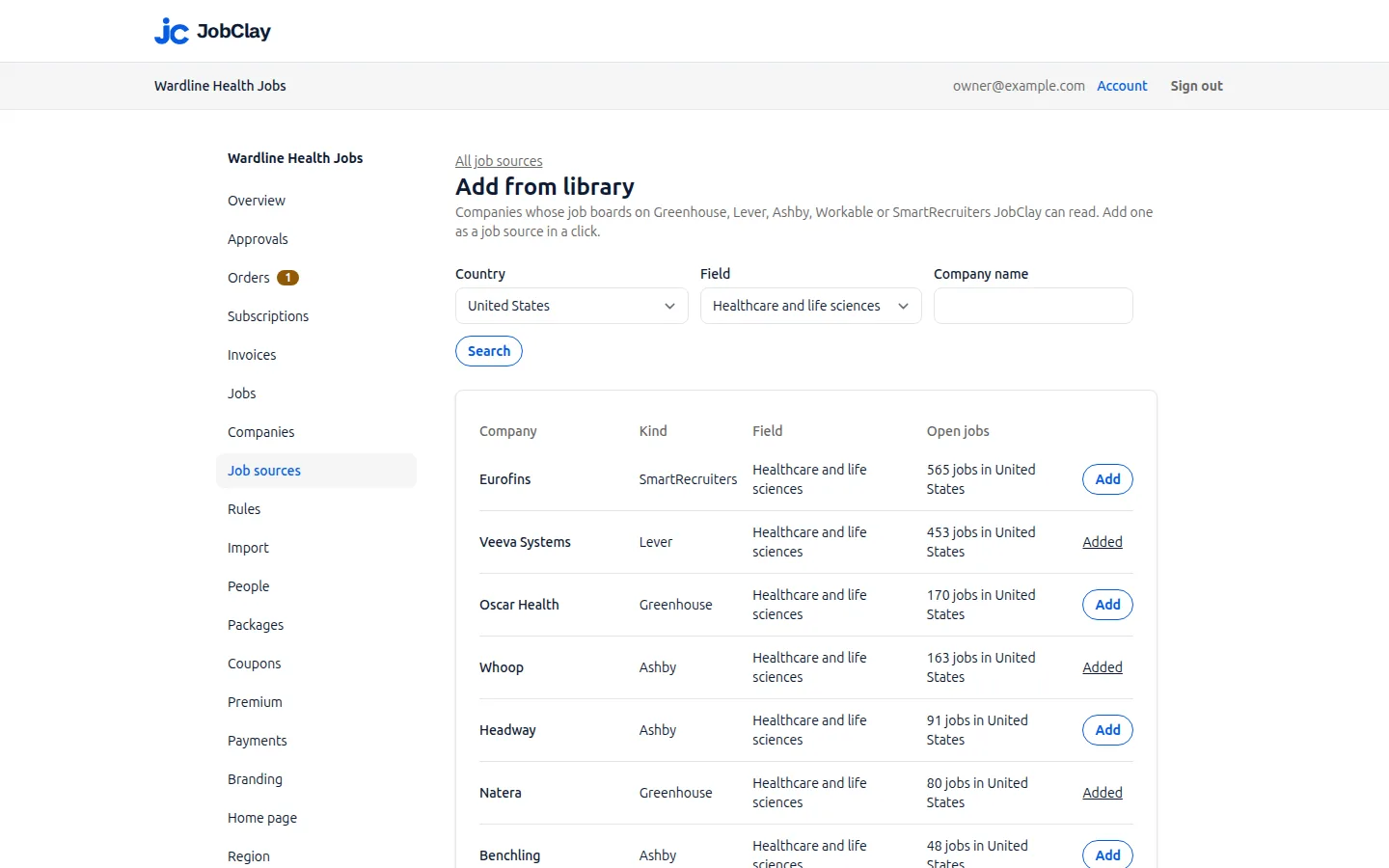
On Job sources, press Add a source: Lever, paste that address into Board name and untick On.
- 4
Set the host and the name
After pasting the address, choose neither US nor EU under Lever host and the address decides. Type the company’s name in Company name as job seekers know it, then press Add source.
- 5
Add an entry level rule
On Rules, choose the new site under Source and add Mark as entry level for titles such as new grad, and for Intern in the commitment field.
- 6
Turn the site on
Open the source, tick On and press Save. Its first run comes shortly, with the job types and the rules already in place.
- 7
Or take it from the library
A company under Add from library needs no address or name, but Add turns it on at once and its first run follows shortly. Map commitments before pressing Add; make the rules after, then press Re-apply to existing jobs on Rules, and again once jobs waiting for room or your approval go live.
What it does not do
- JobClay reads the postings on a company’s public Lever job board only. It does not sign in to a Lever account, so candidates, notes and roles kept off the public board stay in Lever.
- Applicants apply on Lever’s own form, so their applications reach the company in Lever, not your board.
- Every job from one Lever source carries one company: the name you typed or the company you pinned.
Questions
Anything else? See the plans, or start a free board and look around.
How do I know if a company uses Lever’s US or EU host?
Look at the address of one of its jobs: jobs.lever.co means the US host and jobs.eu.lever.co the EU one. Paste that address into Board name and JobClay sets the host for you.
Why does JobClay ask me for the company’s name?
Lever’s postings do not include it. The name you type goes on every job from the source and decides which company on your board they belong to; a pinned company, or one from the source library, needs none.
Will remote Lever jobs show as remote on my board?
Yes, when the posting’s workplace type is remote; hybrid ones show as hybrid. A posting left unspecified is read from its location, so Remote, Canada counts as remote; anything else is in-office unless a Set the work mode rule says otherwise.
Does an internship on Lever count as entry level?
Not by itself. Its commitment can set your internship job type, but entry level is a separate mark: add a rule that reads the commitment field for Intern, and those jobs join the entry level filter too.
What happens when a Lever posting lists several locations?
JobClay reads every location the posting lists, not only the first, and places the job in each one that matches a city on your board. A location written without a country takes the country Lever gives the posting before it is matched.
Related
- Integrations The connections a JobClay board has: your website and domain, jobs in from hiring systems and feeds, jobs out to aggregators and Google, payments and webhooks.
- Greenhouse Fill your job board from companies’ public Greenhouse job boards: what JobClay reads, when pay shows, EU boards, entry level rules and when jobs close.
- Ashby Read any company’s public Ashby job board into your JobClay board: what arrives, when pay shows, how often it runs, and a rule to mark junior roles entry level.
- Workable Bring jobs from any company’s public Workable careers page into your JobClay board, with entry level read from its experience field and rules for the rest.
- Help: Job sources Fill your board with jobs from the source library, hiring systems, XML feeds and careers pages, and choose which go live with settings, rules and approval.
- Job sources Fill a new job board from a company library, Greenhouse, Lever, Ashby, Workable, SmartRecruiters, XML feeds and careers pages, with rules and duplicate checks.
Start your job board today
Free plan, no card needed.